BlogSeptember 26, 2013
Pro Tools Quick Tip: Post Roll
This post originally appeared on this blog.
This is one of those things I notice more producers do NOT have turned on. I personally think it helps me work faster and its possible some people are not aware of it or never bothered to click it. But mainly people are aware of it and somehow decided they don't like it.
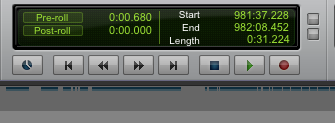 That little "Post Roll" thing (above its in the OFF state) determines whether playback automatically stops when play-head gets to the end of the selection. It pisses me off. Why? I don't know but its how I was used to a DAW acting. If I hit play I want to keep playing until I hit stop. Don't EVER automatically stop. That's just me though.
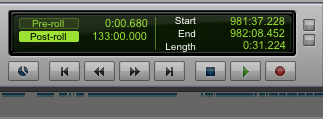 NOW its ON. In fact its meant to be set very specifically but you will notice the value is 133:00:000 which is arbitrary...to me it means NEVER STOP!!
Seriously though, a lot of people don't want the play-head to continue endlessly. They want it to stop on its own. But try out the Post-Roll sometime and see if it helps you.
NOW its ON. In fact its meant to be set very specifically but you will notice the value is 133:00:000 which is arbitrary...to me it means NEVER STOP!!
Seriously though, a lot of people don't want the play-head to continue endlessly. They want it to stop on its own. But try out the Post-Roll sometime and see if it helps you.
That little "Post Roll" thing (above its in the OFF state) determines whether playback automatically stops when play-head gets to the end of the selection. It pisses me off. Why? I don't know but its how I was used to a DAW acting. If I hit play I want to keep playing until I hit stop. Don't EVER automatically stop. That's just me though.
NOW its ON. In fact its meant to be set very specifically but you will notice the value is 133:00:000 which is arbitrary...to me it means NEVER STOP!!
Seriously though, a lot of people don't want the play-head to continue endlessly. They want it to stop on its own. But try out the Post-Roll sometime and see if it helps you.